
One Connected Workflow for Coaches and Consultants
A typical solo coach or consultant pays for seven separate tools to run one client journey: a course platform, a scheduler, an email tool, a form builder, a community app, a payment link and Zapier to hold it together. One connected workflow in GoHighLevel replaces most of them with one login, one contact record and one inbox, so a lead becomes a client without you copying anything by hand.
Why do coaches and consultants end up with seven apps?
Nobody plans a stack of seven tools. A scheduler is added when the first client asks to book. An email tool follows when the list reaches fifty. A form builder, a course platform and a community app each solve one problem on the day they are bought. A year later the business pays for all of them, logs into all of them, and uses Zapier to make them pretend to talk to each other.
The pattern is common beyond coaching. CFIB research finds that 92% of Canadian small businesses use digital tools, but only 10% have fully integrated them. Those that have report $2.40 back for every $1 invested. The value is in the connection, not the count of tools.
| Digital tool use among Canadian small businesses (CFIB) | Share |
|---|---|
| Use some digital tools | 92% |
| Have fully integrated them across operations | 10% |
| Return reported by fully integrated firms | $2.40 per $1 invested |
Source: CFIB report on digital adoption, reported by Lexpert.
What does one connected client journey look like?
The idea is simple: every step of the journey lives on one contact record, and every step triggers the next without you.
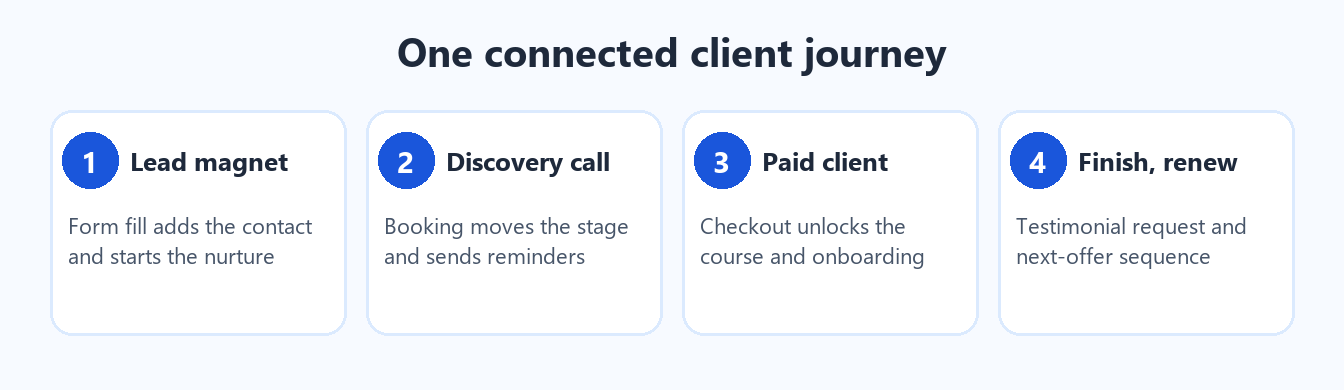
One record, one login, and each step starts the next.
- Lead magnet. A visitor fills in a form for your guide. The system adds them as a contact, tags their interest, delivers the download and starts a five-day email and text nurture.
- Discovery call. When they book, their pipeline stage moves, a confirmation goes out from your number, and reminders follow before the call.
- Paid client. A paid checkout unlocks your course and community automatically and starts the onboarding sequence.
- Finish and renew. Completing the programme triggers a testimonial request and the next-offer sequence.
Nothing in that list needs you to remember to do it, which is the point. It also keeps the whole history of a client in one place, so you can see what they were sent and what they replied.
Which seven apps does it replace?
| Job | Typical separate tool | In one connected system |
|---|---|---|
| Courses and memberships | Course platform | Built-in courses and memberships |
| Booking discovery calls | Scheduler | Calendars with reminders |
| Email and text nurture | Email list tool | Email and two-way text |
| Capturing leads | Form builder | Forms and funnels |
| Client community | Community app | Built-in communities |
| Taking payment | Payment link tool | Keep your processor and connect it |
| Making them talk | Zapier | Native triggers, no middleman |
You keep your payment processor. It connects to the system and is not replaced. Everything else on the list becomes a setting inside one account instead of a separate subscription.
What does a lean setup look like?
More is not better. A lean coach setup uses one domain and one phone number, so replies land in one inbox. Three forms cover almost everything: a lead magnet form, a discovery call application and a client onboarding form. Two calendars handle the rest: discovery calls and client sessions. Three pipelines track where each person is: leads, discovery booked, and clients and renewals.
That is the whole structure. You can add to it later, but you rarely need to.
What about consent and privacy?
In Canada, commercial email and text messages need consent under CASL. Build consent into the lead magnet form, include a visible unsubscribe on every email, and keep the consent record on the contact. A single connected record makes that easier, because the consent log sits next to the message history instead of in a separate tool.
How do you get started without a big project?
Start with an audit. List every tool you pay for, what it costs per month, and which ones do not talk to each other. Most coaches find that the monthly total already exceeds what a single connected system costs. Then migrate in a weekend: forms and calendar first, nurture next, courses last.
If you want it done for you, AI Biz Connect builds this on GoHighLevel under your brand. See the same idea applied to another profession in our law firm client intake workflow.
Frequently asked questions
Does a connected system replace my payment processor?
No. Keep the processor you trust and connect it. Checkout then unlocks courses and starts onboarding automatically, so you get the automation without moving your money.
Is this only for coaches?
No. The same structure fits consultants, trainers and any service business that sells a programme or a series of sessions. The forms and pipelines change, but the connected journey is the same.
How long does the switch take?
A weekend for the core: forms, calendars and the first nurture sequence. Courses, communities and older client lists can follow over the next few weeks, so nothing stops working while you move.
Will I lose my email list?
No. Lists export from your current tool and import into the new one, with their consent records. Keep the old tool running until the new setup has sent its first full cycle, then cancel it.
Replace seven logins with one
See how AI Biz Connect builds one connected workflow for your business.
Prefer to try the platform yourself first?
Some links in this post are affiliate links. We may earn a commission at no extra cost to you.
Sources: CFIB, report on digital tool integration among Canadian small businesses (via Lexpert). Canada's Anti-Spam Legislation (CASL), Government of Canada guidance on consent for commercial electronic messages (fightspam.gc.ca). AI Biz Connect One Connected Workflow series, October 2026.