

Why Your Business Emails Land in Spam: 3 Records, Plain English
Business emails land in spam when your domain cannot prove a message really came from you. Three DNS records fix that: SPF lists who may send, DKIM signs each message, and DMARC says what to do with fakes. Google and Yahoo ask every sender for SPF or DKIM, and bulk senders for all three.
Why do legitimate business emails end up in spam?
Anyone can type your address into the "From" line of an email. Scammers do it every day. So mailbox providers such as Gmail and Yahoo look for proof that a message really came from the domain it claims. When that proof is missing, the message looks the same as a forgery, and it can be filtered.
The proof lives in three short text entries in your domain's settings, called DNS records. Most small businesses never set them up because their website builder or email host did not mention them, and nothing visibly breaks until a quote or invoice goes missing.
What do SPF, DKIM and DMARC do, in plain English?
Think of your domain as an office building with a mail room.
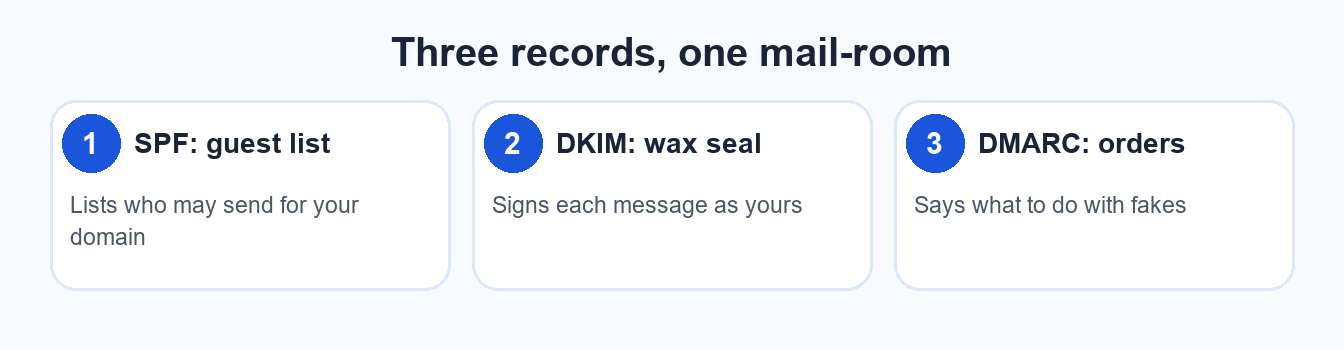
A guest list, a wax seal and a set of instructions for anything that fails.
- SPF is the guest list. It names the servers allowed to send mail for your domain. If a message comes from a server not on the list, the receiver gets a reason to doubt it.
- DKIM is the wax seal. Your email system signs each message with a private key, and the receiver checks the seal against a public key in your DNS. A broken seal means the message was altered or not yours.
- DMARC is the instruction sheet. It tells receivers what to do when SPF and DKIM checks fail, whether to deliver, quarantine or reject, and where to send reports so you can see who is using your name.
| Record | What it does | Who sets it | How to check |
|---|---|---|---|
| SPF | Lists the servers allowed to send for your domain | Whoever manages your domain's DNS, using values from your email provider | Look up your domain's TXT records, or use a free email authentication checker |
| DKIM | Adds a signature to each message that receivers can verify | Your email provider generates the key; you or your DNS manager publish it | Send a test message and view the original headers, or use a free checker |
| DMARC | Sets the policy for failures and requests reports | You, in DNS, usually starting with a monitoring-only policy | Look up a TXT record at _dmarc.yourdomain, or use a free checker |
What do Gmail and Yahoo actually require?
Both providers publish their rules. Here is what the two pages say, accessed October 17, 2026.
| Requirement | Yahoo | |
|---|---|---|
| All senders: authentication | SPF or DKIM for the sending domain | SPF or DKIM at a minimum |
| Bulk senders: authentication | SPF and DKIM, plus DMARC (policy may be none) | SPF and DKIM, plus a DMARC policy of at least none that passes |
| Bulk senders: alignment | From domain must align with the SPF or DKIM domain | From domain must align with the SPF or DKIM domain |
| Marketing mail: unsubscribe | One-click unsubscribe plus a visible link | One-click unsubscribe plus a visible link; honour requests within 2 days |
| Spam complaint rate | Keep below 0.3% | Keep below 0.3% |
Google defines a bulk sender as one sending more than 5,000 messages a day to Gmail addresses. Yahoo's page refers to bulk senders without stating a number. Most small businesses sending quotes, invoices and a monthly newsletter are well under that line.
That does not make the records optional for you. Google lists SPF or DKIM as a requirement for every sender, and a domain with none of the three gives receivers nothing to trust. Setting all three is a one-time job that also protects your name from being used in fake invoices.
How can you check yours in 2 minutes?
- Open a free email authentication checker. Search for "SPF DKIM DMARC checker". Several free ones exist; any reputable one will do.
- Enter your domain, the part after the @ in your email address.
- Read the three results. Each record should show as found and valid. "Not found" or "multiple SPF records" is the fix list.
- Send a test email to a personal Gmail account. Open the message, choose "Show original", and look for SPF, DKIM and DMARC marked as PASS.
If any line fails, send the checker's result to whoever manages your domain or email. It is usually a quick fix.
What should you do about it?
Start with whatever is missing, in this order: SPF, then DKIM, then DMARC with a monitoring-only policy so nothing is blocked while you learn what your domain sends. Once the reports look clean, you can tighten the policy later. Avoid adding more than one SPF record, and only list services that really send mail for you, such as your email host, your invoicing tool and your newsletter tool.
Or start with a proper mailbox. Web Techies, our sister company, offers business email on your own domain from $4.99 per mailbox per month, and it lists a premium Google or Microsoft 365 option from $12.99 per user per month (pricing checked October 17, 2026 at webtechies.net/email). We compare the cost of a custom address with a free Gmail one in business email on your own domain vs Gmail.
Frequently asked questions
Will SPF, DKIM and DMARC stop all my email going to spam?
No. They prove who you are, which removes one common reason for filtering. Content, complaint rates and how people respond to your mail still matter. Think of them as the foundation, not the whole building.
Is a DMARC policy of "none" safe to start with?
Yes. It blocks nothing and sends you reports about who is sending mail as your domain. Google's page allows a policy of none for bulk senders, so it is a sensible first step before tightening.
Do I need all three if I only email a few customers?
Set up all three anyway. Google asks every sender for SPF or DKIM, and DMARC protects your name from being used in fake messages. It is a one-time job, and it takes much less time than recovering a lost invoice.
Who do I ask to change these records?
Whoever manages your domain's DNS, often the registrar, your web host or your website provider. Your email provider supplies the exact values to enter. If you are unsure who that is, a domain lookup shows the nameservers.
Get your business email set up properly
Web Techies offers business email on your own domain. Ask about SPF, DKIM and DMARC when you sign up.
Want a second opinion on your whole web presence?
Sources: Google, Email sender guidelines (support.google.com/a/answer/81126), accessed October 17, 2026. Yahoo, Sender best practices and requirements (senders.yahooinc.com/best-practices), accessed October 17, 2026. Web Techies business email pricing from webtechies.net/email, checked October 17, 2026.