

Why Most Small Businesses Don't Pay for AI
Most small businesses use AI, but only about 1 in 10 pays for a dedicated AI tool, according to Intuit's 2026 report. Cost is not the main barrier. Privacy, fear of errors and not knowing what AI can do are. So start small: pick one customer-facing task, set it up, and measure it for two weeks.
How many small businesses actually pay for AI?
Very few, compared with how many use it. Intuit QuickBooks published its 2026 AI Impact Report on May 12, 2026, drawing on survey answers from more than 34,000 small and midsize business owners plus anonymised data on more than 5.3 million QuickBooks businesses in the US, Canada, the UK and Australia.
| Finding | Result | Source |
|---|---|---|
| Businesses using AI regularly, across the four countries | Roughly 7 in 10 | Intuit, May 12, 2026 |
| Businesses paying for a dedicated AI tool, in every market | Roughly 1 in 10 | Intuit, May 12, 2026 |
| US businesses with payment records that paid for dedicated AI tools, 2021 to 2025 | 12% | Intuit, May 12, 2026 |
| US businesses that paid in 2024 and were still paying in 2025 | 86% | Intuit, May 12, 2026 |
| Canadian businesses that used AI to produce goods or deliver services in the previous 12 months | 19.2% | Statistics Canada, released June 11, 2026 |
The two sources ask different questions, so do not compare the Intuit and Statistics Canada rows. Intuit's page gives no Canada-only figure for paid tools.
Read the table as a story. Plenty of owners try AI. Few commit money. Yet among the US businesses that did pay in 2024, 86 percent were still paying a year later. Once a tool earns its place, it tends to stay.
If it is not the price, what is holding owners back?
Intuit's report says cost is not the biggest barrier. The barriers it names cluster around three worries: privacy and security, fear of errors, and uncertainty about what AI can do. The page does not give a percentage for each, so we will not invent one.
Statistics Canada points the same way. In its analysis of the survey run from April 1 to May 6, 2026, cybersecurity or privacy concerns were the most-cited barrier to using AI (13.4%), with cost second (10.6%).
That matches what we hear from owners. The monthly fee is rarely the problem. You are wondering whether it will say something wrong to a customer, whether your clients' details are safe, and what it can really do for a business your size. Those are fair questions, and you do not need to look foolish asking them.
What should you set up first?
Choose the task where a result is easy to see and a mistake is cheap to fix. For most small businesses that means a customer-facing task where speed matters, because nothing needs to be invented. You are only making sure that people who already contacted you get an answer.
| First task | What it does | Why it is a safe start |
|---|---|---|
| Missed-call text-back | Sends a short text to a caller you could not answer, with your booking link | The message is written once by you and never changes |
| Enquiry reply | Acknowledges a web form or message and asks one question to move it forward | A person can review the wording first, and the topic is narrow |
Leave pricing, complaints and anything legal for later, or keep a person on them permanently. Before you switch on any text messages in Canada, check the consent and opt-out rules under CASL.
The stakes are simple. A call that goes to voicemail can be a customer who rings the next business on the list. Answered and booked, the same call becomes a job on your calendar.
How do you measure it in two weeks?
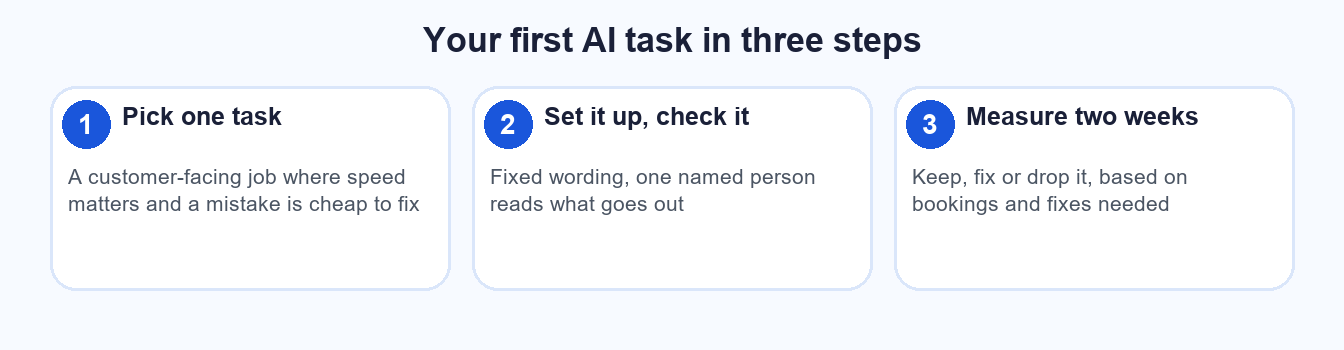
One task, one owner, two weeks of notes.
- Write the starting point. How many calls or enquiries did you miss or answer late last week? A rough count is fine.
- Turn on one task and name an owner. One person reads the messages that go out and fixes the wording.
- Keep a tally for two weeks. Count enquiries answered within a few minutes, bookings made from those replies, and messages that needed a fix.
- Decide. If bookings went up and fixes were rare, keep it and add a second task. If not, tighten the wording or stop. Stopping is a fine result.
If you already use an AI tool and are unsure it pays, last week's five-question check gives you a one-page way to score it.
Frequently asked questions
Am I behind if I do not pay for any AI tool?
No. Intuit finds roughly 7 in 10 businesses use AI regularly, but only about 1 in 10 pays for a dedicated tool. Many owners use free tools or have not started. Being deliberate matters more than being early, so choose one task and test it before you buy anything.
Is a free AI tool good enough?
Sometimes. Free tools suit drafting and brainstorming. Keep customer personal information out of any public tool until you have checked how the vendor handles it. For customer messages, you also want a record of what was sent, a clear opt-out and one inbox where replies land, which free tools rarely give you.
How much should I budget?
Set the budget from the task, not the tool. Estimate what one missed enquiry is worth to you, then compare that with the monthly cost. If the tool needs a few extra bookings to pay for itself, that is a number you can test in two weeks.
What if the AI says something wrong to a customer?
Start with fixed wording, not free-form answers, and keep a person reviewing what goes out. Fear of errors is one of the top barriers in Intuit's report, so design for it: narrow topic, clear hand-off to a human, easy opt-out.
Not sure which task to start with?
Bring your phone and your inbox to a free 15-minute call. We will point to the one task worth setting up first.
Sources: Intuit QuickBooks, 2026 AI Impact Report (published May 12, 2026; intuit.com/blog/global-stories/ai-impact-report), accessed October 24, 2026. Statistics Canada, Analysis on artificial intelligence use by businesses in Canada, second quarter of 2026 (release dated June 11, 2026; survey collected April 1 to May 6, 2026), accessed October 24, 2026. Government of Canada, Canada's anti-spam legislation (fightspam.gc.ca), accessed October 24, 2026.