

Pick Your Business Name Before Someone Else Does
Your business name, domain and email address are the first things a customer sees and the hardest to change later. Check that your name is free as a domain, register it before someone else does, then set up business email on it. With a plan, it fits in one afternoon.
Why pick your business name before someone else does?
A name is only useful if people can find it, type it and email it. If the matching .com is taken, you may end up with a long workaround, a different spelling or an address your customers mistype. Domains are first come, first served, and a good one can disappear while you are still choosing a logo.
So check the name where customers will look for it. Say it out loud, spell it to a friend over the phone, and see whether the domain and your social handles are free. If you are registering the name with a government registry, check with the registry that applies to you as well. Then register the domain the same day you decide, even if the website comes later.
Web Techies, our sister company, lists the following on its domains page, checked October 24, 2026. Prices are in Canadian dollars.
| Item | Price listed |
|---|---|
| .com domain | $19.99 for the first year, then $26.77 a year |
| Domains from | $14.77 (.co, first year) |
| WHOIS privacy add-on | $4.00 a year |
| Extensions available | 200+ |
| Standard business mailbox | $4.99 per mailbox per month |
| Premium mailbox (Google or Microsoft 365) | From $12.99 per user per month |
As a worked example, one .com for the first year, the privacy add-on and two standard mailboxes for 12 months comes to $143.75 at those listed prices (19.99 + 4.00 + 2 x 4.99 x 12). Your total will depend on the extension and the number of mailboxes you choose.
What does the afternoon look like?
You do not need to be technical. You need a list and about three hours.
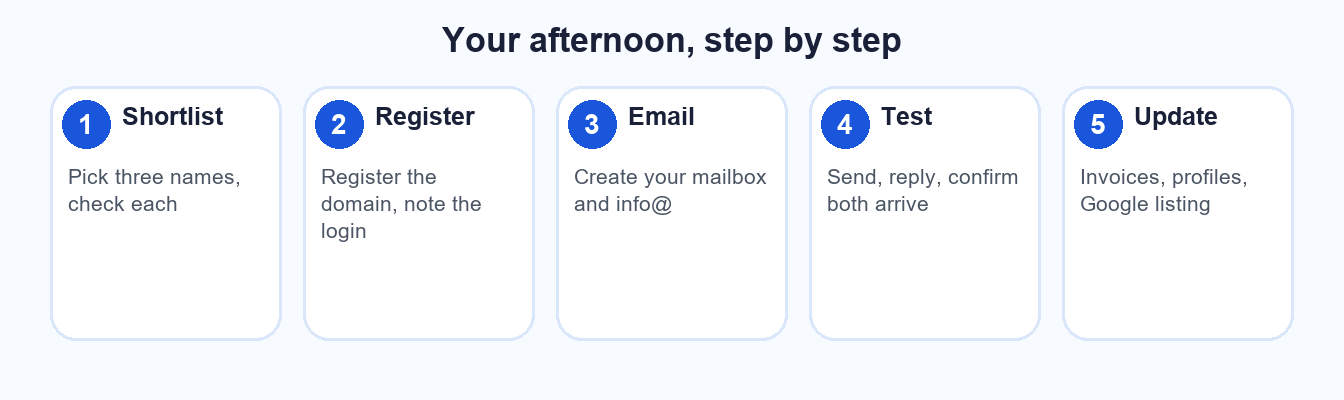
Five steps, one afternoon, and your name is yours.
| Time | Step | What to do |
|---|---|---|
| First 30 minutes | Shortlist and check | Pick three names. Check the domain for each. Choose one. |
| Next 15 minutes | Register the domain | Register it, decide on the privacy add-on and note who holds the login. |
| Next 45 minutes | Set up email | Choose a plan, create your own mailbox and one shared one such as info@. |
| Next 30 minutes | Connect your devices | Add the mailboxes to your phone and laptop, and set a signature. |
| Next 15 minutes | Send a test | Email a personal Gmail account, reply, and confirm both arrive. |
| Last hour | Update where your name appears | Invoices, social profiles, your Google Business Profile and your website contact page. |
Two of our earlier posts make the middle steps easier. Business email on your own domain vs Gmail compares the costs. After you send your test, why business emails land in spam shows you how to check that your mail is trusted. For the last step, our Google Business Profile checklist covers hours and contact details.
Does your website look out of date? A 3-minute test
If you already have a website, use the afternoon to check it too. Open it on your phone and run through four questions.
- Mobile. Does it fit your phone screen without pinching and zooming, and can you tap the phone number?
- HTTPS. Does the address start with https and show a padlock or similar secure indicator?
- A recent year. Scroll to the bottom. Does the copyright line show a recent year, and do any news or offers refer to the current season?
- Current hours. Do the opening hours, phone number and address match what you tell customers today?
Four yes answers is a good sign. Each no is a fix, and the hours question is the cheapest one to correct.
This is a common gap. In a check of 96 GTA professional-service businesses we ran in August 2026, 11 of the 87 whose sites loaded (13 percent) looked out of date by our test, and 8 of the 35 accountant sites we could assess (23 percent) did. That was a convenience sample, not a random one, and it is not an estimate for all GTA businesses. We have not named any of them.
If you fail more than one question, a domain and email are still the right place to start. Your name and address are what a new site gets built on.
Frequently asked questions
Should I register the domain before I have a website?
Yes. Registering is cheap and quick, and the website can follow. Holding the name stops someone else registering it while you build. Make sure the domain is registered in your business's name, with a login you control, so a former web designer or relative never holds the keys to your name.
Do I need business email, or is Gmail fine?
A free address works to start. A name@yourbusiness address looks more established, stays with you if you change providers, and keeps work mail separate. Web Techies lists standard business mailboxes from $4.99 per mailbox per month, with calendars and spam filtering.
What is the WHOIS privacy add-on?
When you register a domain, your contact details are normally stored in a public lookup. A privacy add-on, listed by Web Techies at $4.00 a year, is meant to keep those details out of public view. Check what applies to your extension when you register.
How many mailboxes do I need?
Start with one for you and one shared address such as info@ for enquiries. Add one per person when the team grows. Every mailbox is billed separately, so more is not better. You can add another later when someone joins, so there is no need to guess your team size today.
Claim your name today
Search your business name at Web Techies, our sister company, and see what is still free.
Already have a domain? Put email on it.
Sources: Web Techies, Domains (webtechies.net/domains) and Business email (webtechies.net/email), prices in Canadian dollars as listed, checked October 24, 2026. AI Biz Connect internal check of 96 GTA professional-service businesses, August 2026 (convenience sample, businesses not named). The 3-minute test and the afternoon plan are general guidance, not a standard.